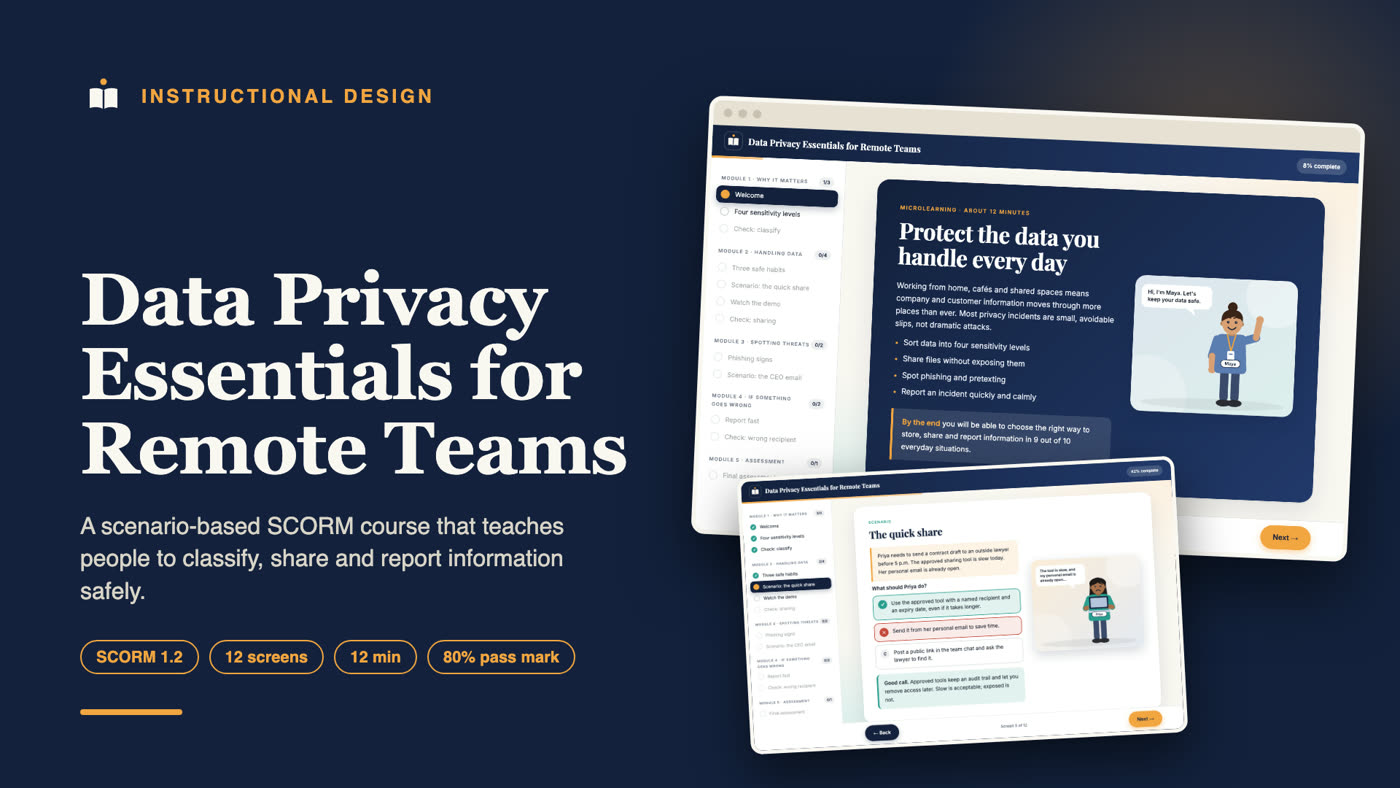
About this project
Data Privacy Essentials for Remote Teams is a 12-minute, scenario-based eLearning course that teaches remote and hybrid staff how to classify information, share files safely, spot phishing, and report a privacy incident quickly. It is delivered as a SCORM 1.2 package that works in common learning management systems (LMS) and as a web version that runs in any browser.
I designed and built it from the learning objectives through to the packaged, tested course. This page explains what the course contains, how it is designed, and why it is built the way it is.
Who this course is for
- Companies with remote, hybrid or distributed teams that need practical data protection training.
- HR, compliance, IT and operations managers who must show that staff completed privacy awareness training.
- Course creators and training providers who sell or deliver compliance and security awareness courses on an LMS.
- Small and growing businesses with no in-house instructional designer.
The learning problem
Most privacy and security incidents in small organisations are not clever attacks. They are everyday slips: a contract sent from a personal email, a link set to "anyone with the link", a rushed click on a message that looked urgent. Long policy documents and slide decks do not change these habits, because people read them once and forget them.
The goal of this course is behaviour, not recall. After 12 minutes a learner should be able to make the right choice in the situations they actually meet at work.
Learning objectives
By the end of the course, learners can:
- Sort information into four sensitivity levels (public, internal, confidential, restricted) and say who may see each one.
- Choose a safe way to store and share a confidential file, including named access and expiry dates on links.
- Recognise four warning signs of a phishing or impersonation message and respond correctly.
- Report a privacy incident within the hour, with plain facts and no blame.
Every screen, scenario and quiz question maps to one of these four objectives. Nothing is included just to fill time.
Course structure
The course has five modules and eleven screens:
| Module | What learners do |
|---|---|
| 1. Why it matters | Read the outcomes, open four cards on the sensitivity levels, answer a classification check |
| 2. Handling data | Learn three safe habits, work through the "quick share" scenario, check link settings |
| 3. Spotting threats | Explore four phishing signs, handle an urgent request that appears to come from the CEO |
| 4. If something goes wrong | Learn the four reporting steps, answer a wrong-recipient check |
| 5. Assessment | Complete an 8-question final assessment and receive a completion certificate |
Instructional design choices
One idea per screen
Each screen carries a single idea in short, plain sentences. This keeps the cognitive load low and works on a phone as well as a laptop, which matters for remote staff who take training in short gaps.
Scenarios instead of lectures
Two decision-based scenarios put learners in a realistic position: Priya must send a contract to a lawyer under time pressure, and an email that appears to be from the CEO demands gift cards. Learners choose an action and receive feedback that explains the reasoning, so the lesson sticks.
Feedback that teaches
A wrong answer is never just marked wrong. Each option has its own explanation. A learner who picks the unsafe choice learns exactly why it is unsafe, and the Next button stays locked until they choose the right answer. Wrong choices are therefore a learning moment, not a dead end.
Gated progress
Learners must open every card and answer every check before moving on. The side menu shows completed, current and locked screens, so people always know where they are. Progress is saved as a bookmark, so a learner who closes the browser resumes where they stopped.
A fair assessment
The final assessment has eight questions drawn from all four objectives, a pass mark of 80%, and unlimited retries. A learner who fails sees a short review that explains each missed question. This keeps the assessment honest while still supporting people who need a second attempt.
Characters and demonstration video
The course features original 2D characters, drawn for this project with different skin tones, hair and outfits, so learners see people like themselves in the scenarios. A friendly guide welcomes learners on the first screen, and each scenario shows the people involved with speech bubbles.
A short animated demonstration video, "sharing a contract the safe way", plays inside the course. It shows the skill being done step by step, with captions and step labels, before learners practise it. The video is packaged inside the SCORM file and has a transcript for accessibility.
SCORM and LMS details
The course is packaged as SCORM 1.2 with a valid manifest (imsmanifest.xml) and a single launchable SCO.
- Completion and pass/fail: the course reports
incomplete,passedorfailedto the LMS. - Score: the raw score (0 to 100), minimum and maximum are reported.
- Mastery score: the 80% pass mark is declared in the manifest.
- Bookmarking: lesson location and suspend data let learners resume.
- No LMS needed: when no LMS is present, the same course runs in the browser and stores progress locally, which is how the web preview on this site works.
Visual design and accessibility
Every lesson screen has an original vector illustration drawn for the course, and answer feedback is colour-coded (green for right, red for wrong). The course uses a restrained navy, amber and warm off-white palette with a serif headline font and a clean sans-serif body font, so it looks professional without distracting from the content. Text is large, contrast is high, buttons are real buttons that can be reached with a keyboard, and the layout adapts to small screens.
How the course was built
I wrote the content and structure first, then built a reusable course player in HTML, CSS and JavaScript that reads a simple content file. That approach lets one design pattern produce many consistent courses and makes updates quick: change the text, rebuild, and re-export the SCORM package.
Before delivery I ran an automated click-through of the whole course against a mock LMS to confirm that locked screens stay locked, wrong answers are flagged, a failed attempt reports failed, a passing attempt reports passed with the correct score, and the certificate appears.
What you get in a project like this
- Learning objectives and a content outline for approval
- A scripted, storyboarded course with scenarios and a final assessment
- A branded course with your colours and logo
- A SCORM package (1.2 or 2004) and a web version
- A short walkthrough video so your team can run and update it
- A handover guide for the LMS import
Skills shown in this project
Instructional design, eLearning development, SCORM packaging, scenario-based learning, assessment design, compliance and security awareness training, microlearning, LMS integration, learning objectives and course storyboarding.
Work with me
I am an instructional designer and LMS specialist. I build self-paced courses, set up and fix learning platforms, and package eLearning for SCORM-compliant LMS delivery. If you have a course to build, a platform that is not behaving, or you are still choosing a platform, send me your topic, your learners and what is stuck right now, and I will reply with where I would start.
Frequently asked questions
What is a SCORM course?
A SCORM course is an eLearning package that follows a standard so it can run in almost any learning management system and report completion and scores back to it.
How long does it take to complete this course?
About 12 minutes, including the final assessment.
Can this course be used in my LMS?
It is a standard SCORM 1.2 package, which most LMS platforms accept, including Moodle, TalentLMS, LearnWorlds and others that support SCORM uploads. Always run a test import in your own LMS before launching to learners.
Can the content be changed for my company?
Yes. The names, scenarios, sensitivity levels, quiz questions and branding can all be adapted to your policies and tools.
Is this legal or compliance advice?
No. The course teaches general good practice in handling information. Your organisation's own policies and the laws that apply to you come first, and they should be reviewed by a qualified person.
What is the difference between instructional design and just making slides?
Instructional design starts with what learners must be able to do afterwards, then builds practice, feedback and assessment around that goal. Slides tell people things; a designed course helps them do things.
Do you also fix existing courses?
Yes. I set up and clean up courses and platforms, including structure, learner access, enrolments, quizzes and certificates.