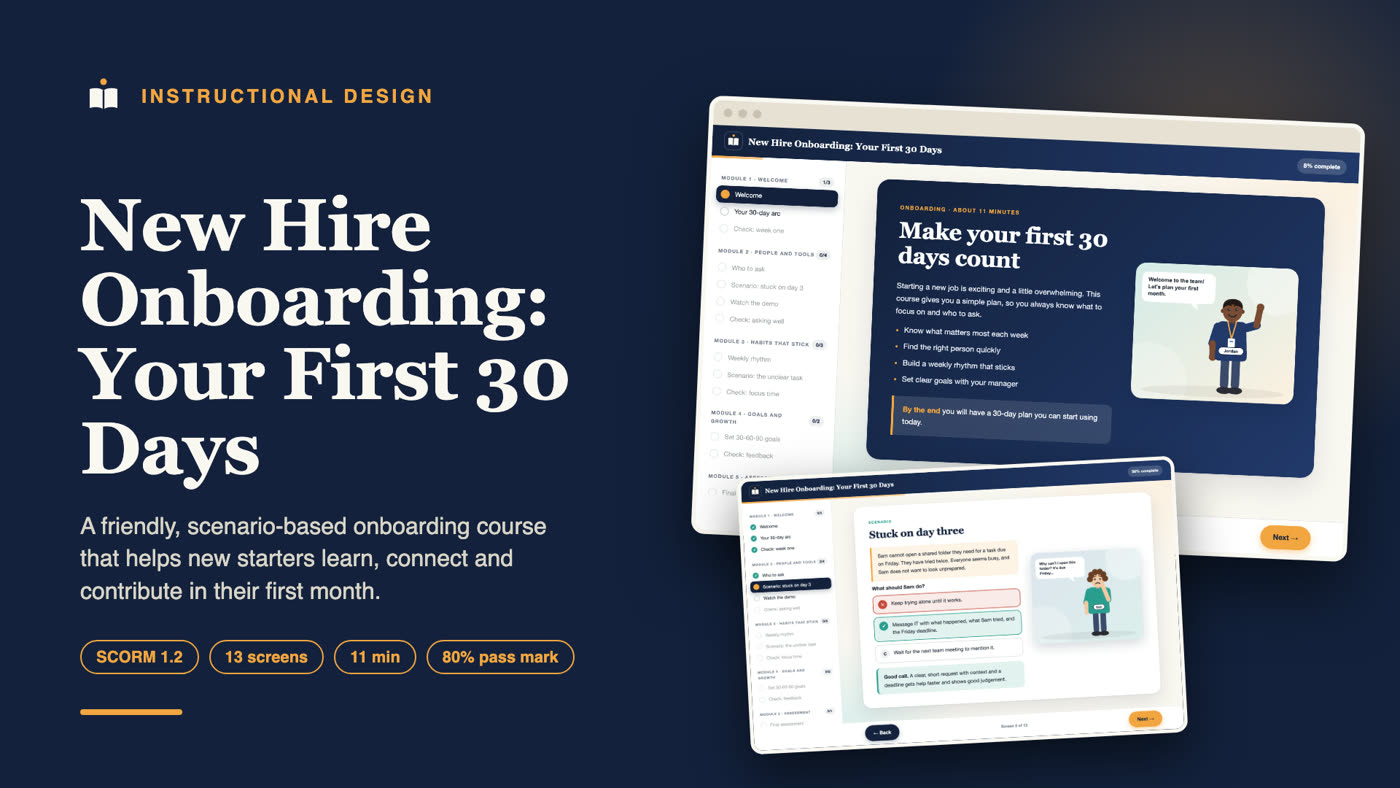
About this project
New Hire Onboarding: Your First 30 Days is an 11-minute, scenario-based eLearning course that gives new starters a clear plan for their first month: what to focus on each week, who to ask for help, how to build a weekly routine, and how to agree goals with a manager. It is packaged as a SCORM 1.2 course for any compatible learning management system (LMS) and also runs as a web version in a browser.
I designed, wrote and built the whole course, from the learning objectives and storyboard to the interactive screens, the final assessment and the SCORM package. This page explains what it contains and why it is designed the way it is.
Who this course is for
- HR and people teams who want a consistent, friendly welcome for every new hire, remote or on site.
- Hiring managers who do not have time to repeat the same first-week advice for each person.
- Small and growing companies with no dedicated onboarding programme.
- Training providers and course creators who sell onboarding content to clients on an LMS.
The problem it solves
New starters rarely fail because they lack skill. They struggle because the first weeks feel vague. Nobody says what to do first, who to ask, or what good looks like at day 30. People then stay quiet, guess, or wait, and managers read that silence as a lack of initiative.
A long welcome pack does not fix this, because people skim it once and forget it. This course turns the advice into short, practical decisions the learner makes themselves, so the habits are practised, not just read.
Learning objectives
By the end of the course, a new starter can:
- Describe the focus of each of the first four weeks (learn, connect, contribute, own).
- Choose the right person to ask for help and write a request that is quick to answer.
- Set up a simple weekly rhythm with goals, focus time and a Friday review.
- Turn a vague task into a clear one by proposing the result and the deadline.
- Agree 30, 60 and 90 day goals and ask for specific early feedback.
Every screen, scenario and assessment question supports at least one of these five objectives.
Course structure
The course has five modules and twelve screens:
| Module | What the learner does |
|---|---|
| 1. Welcome | Reads the outcomes, opens four cards showing the 30-day arc, answers a week-one priorities check |
| 2. People and tools | Learns who to ask for what, handles the "stuck on day three" scenario, picks the best help request |
| 3. Habits that stick | Builds a weekly rhythm, resolves the "unclear task" scenario, checks the value of focus time |
| 4. Goals and growth | Learns to set 30-60-90 goals and answers a question about asking for feedback |
| 5. Assessment | Takes an 8-question final assessment and receives a completion certificate |
A walk through the course
A new starter opens the course on day one and sees a short welcome with four clear outcomes. On the next screen they open four colour-coded cards, one for each week, and read what each week is for. A quick check asks what to prioritise on day two. They try a wrong answer, read why it does not work, and pick the right one before moving on.
In the second module they learn who to ask for what, then meet Sam, who is stuck on day three. The learner chooses what Sam should do and sees the reasoning behind each choice. A short screen then contrasts a vague help request with a clear one, so the pattern sticks.
The third module builds a weekly routine: Monday goals, daily focus time and a Friday review. The "unclear task" scenario shows how to turn a vague instruction into a clear plan. The fourth module ends with 30-60-90 day goals and how to ask for useful early feedback. Finally, the learner takes an eight-question assessment. A pass sends the score and status to the LMS and shows a certificate; a fail shows a short review and allows a retry.
Design choices that make it work
A simple arc to hold on to
The four-week arc (learn, connect, contribute, own) is the backbone. Learners meet it on screen two and every later scenario ties back to it. One memorable structure beats a long list of tips.
Scenarios from real first weeks
The two scenarios reflect situations almost every new starter faces. In "Stuck on day three", Sam cannot open a shared folder and does not want to look unprepared. In "The unclear task", a manager sets a vague task and is travelling. Learners choose an action, then see why each option helps or hurts.
Feedback that coaches
Each answer option has its own explanation, so a wrong choice teaches something specific. The Next button stays locked until the learner picks the best option, which makes mistakes a safe part of learning.
A model to copy
The "good help request" screen shows a weak message next to a strong one: what happened, what was tried, and when it is needed. A concrete model is easier to copy than an instruction to "communicate clearly".
Short and flexible
At about eleven minutes, the course fits into a first-day or first-week schedule. Progress is bookmarked, so someone who is interrupted can pick up where they stopped.
Characters and demonstration video
The course features original 2D characters, drawn for this project with different skin tones, hair and outfits, so learners see people like themselves in the scenarios. A friendly guide welcomes learners on the first screen, and each scenario shows the people involved with speech bubbles.
A short animated demonstration video, "asking for help the right way", plays inside the course. It shows the skill being done step by step, with captions and step labels, before learners practise it. The video is packaged inside the SCORM file and has a transcript for accessibility.
SCORM and LMS details
The course is a SCORM 1.2 package with a valid manifest and a single launchable SCO.
- Status: reports incomplete, passed or failed to the LMS.
- Score: reports the raw score from 0 to 100, with the 80% mastery score declared in the manifest.
- Resume: saves the learner's position and progress.
- Browser version: with no LMS present, the same course runs in a browser and saves progress locally.
Visual design and accessibility
Each lesson screen has an original vector illustration, the layout is clean and uncluttered, and colour is never the only signal: right and wrong answers also show a tick or cross. Text is large with strong contrast, all controls are real buttons that work with a keyboard, and the layout adapts to smaller screens.
How it was built
I wrote the content first, then used a reusable course player in HTML, CSS and JavaScript that reads a simple content file. This keeps every course consistent and makes updates fast: change the text, rebuild, and export a fresh SCORM package.
Before delivery I ran an automated click-through of the whole course against a mock LMS to check that locked screens stay locked, wrong answers are flagged, a failed attempt reports a fail, and a pass reports the correct score and shows the certificate.
What a project like this includes
- Learning objectives and a content outline for approval
- A storyboarded course with scenarios, checks and a scored assessment
- Your branding, colours and logo
- A SCORM package (1.2 or 2004) and a web version
- A short walkthrough video for your team
- A simple handover guide for the LMS import
Skills shown in this project
Instructional design, eLearning development, onboarding and employee training, scenario-based learning, assessment design, microlearning, SCORM packaging, learning objectives and storyboarding.
Work with me
I am an instructional designer and LMS specialist. I build self-paced courses, set up and fix learning platforms, and package eLearning for SCORM-compliant delivery. Send me your topic, your learners and what is stuck right now, and I will reply with where I would start.
Frequently asked questions
What should a new hire onboarding course include?
A good one gives a clear plan for the first weeks, shows who to contact for what, builds a weekly routine, and ends with goals and feedback. This course covers all four in under twelve minutes.
How long does this course take?
About eleven minutes, including the final assessment.
Will it work in my LMS?
It is a standard SCORM 1.2 package, which most platforms accept. Run a test import in your own LMS before launching to learners.
Can the content be changed for my company?
Yes. The names, scenarios, tools, goals and branding can all be adapted to your organisation.
Is this only for remote staff?
No. The advice works for remote, hybrid and on-site teams. The scenarios can be adjusted to match your setting.
What is the difference between onboarding and orientation?
Orientation covers the basics on day one, such as paperwork and logins. Onboarding is the longer process of becoming effective in the role, and that is what this course supports.