About this project
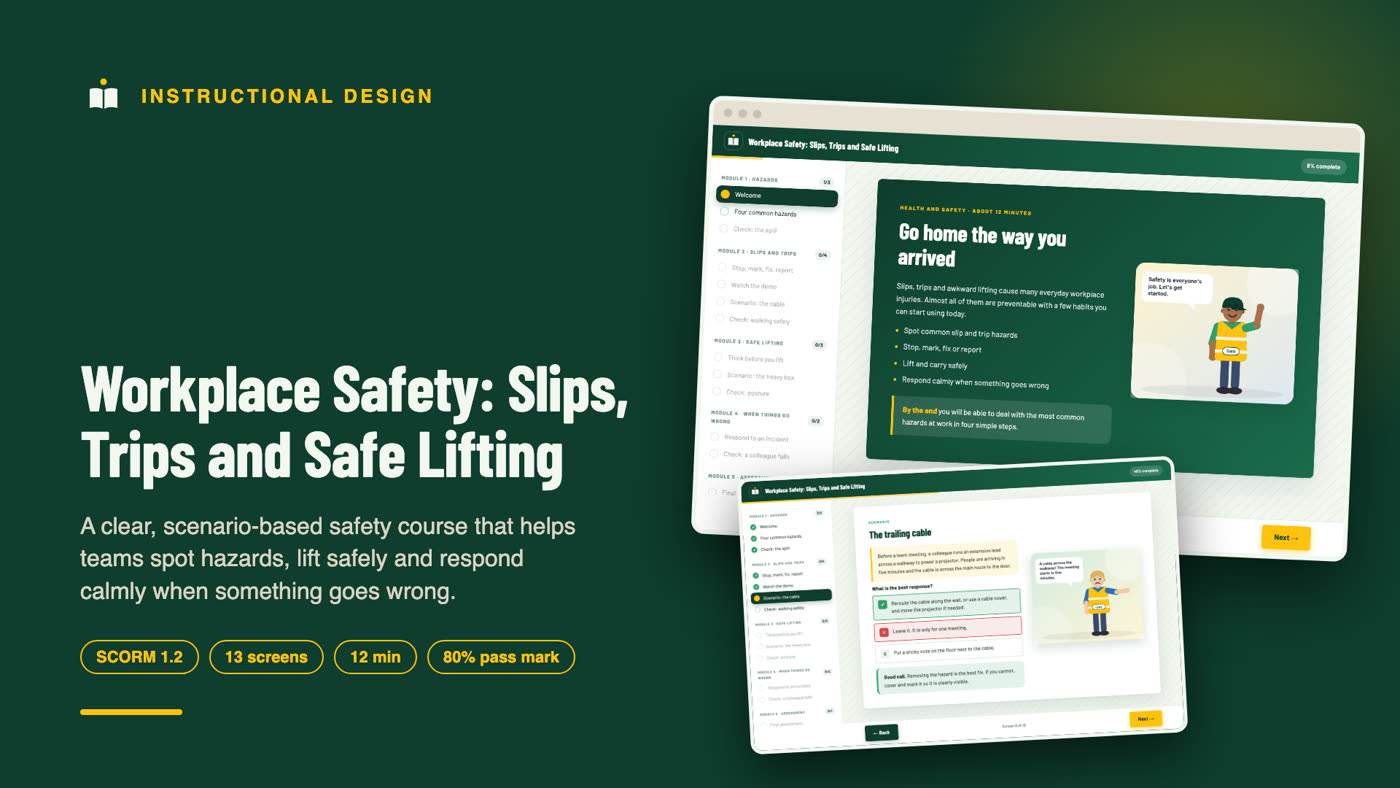
Workplace Safety: Slips, Trips and Safe Lifting is a 12-minute, scenario-based eLearning course that helps employees spot everyday hazards, deal with them in four simple steps, lift and carry safely, and respond calmly when someone is hurt. It is packaged as a SCORM 1.2 course for any compatible learning management system (LMS) and also runs in a browser as a web version.
I designed, wrote and built the whole course, from the learning objectives and storyboard to the interactive screens, the scored assessment and the SCORM package. This page explains what is inside and why it is designed this way.
Who this course is for
- Warehouse, retail, hospitality, office and facilities teams where floors, deliveries and boxes are part of the day.
- Health and safety officers, HR teams and managers who need a short, consistent refresher for staff.
- Training managers who want a practical module for an LMS, with a score and a certificate for the record.
- Course creators and training providers who sell health and safety content to clients.
The problem it solves
Slips, trips and manual handling cause a large share of ordinary workplace injuries. They are rarely dramatic. A spill that nobody mentioned, a cable across a walkway, a box lifted in a hurry. Because they feel minor, people tend to ignore the hazard, assume someone else will deal with it, or skip the extra minute needed to do it safely.
Safety slides that list rules do not change that behaviour. This course puts the learner in the moment: they see a hazard, face a time-pressured choice, and learn why the safer option is also the practical one.
Learning objectives
By the end of the course, learners can:
- Recognise four common sources of slips and trips: wet floors, clutter and cables, poor lighting and uneven surfaces.
- Use a four-step routine (stop, mark, fix or report) to deal with a hazard.
- Plan and carry out a lift with good posture, and know when to ask for help or equipment.
- Respond to an incident by making the area safe, getting help and reporting it, including near misses.
Every screen, scenario and assessment question maps to one of these four objectives.
Course structure
The course has five modules and twelve screens:
| Module | What the learner does |
|---|---|
| 1. Hazards | Reads the outcomes, opens four hazard cards, handles a spill in a busy corridor |
| 2. Slips and trips | Learns the stop-mark-fix-report routine, solves "the trailing cable", picks safe walking habits |
| 3. Safe lifting | Learns plan-position-lift-move, handles "the heavy box", chooses the correct lifting posture |
| 4. When things go wrong | Learns how to respond to an incident and decides what to do when a colleague falls |
| 5. Assessment | Takes an 8-question final assessment and receives a completion certificate |
A walk through the course
A learner starts with four outcomes and then opens four colour-coded cards covering the hazards behind most accidents. In the first check they see a small spill in a busy corridor while rushing to a meeting. The tempting options, stepping around it or wiping it with a tissue, are explained, so the learner understands why warning others and reporting it matter.
In module two the four-step routine is applied to a cable across a walkway minutes before a team meeting. The best answer removes the hazard by rerouting or covering the cable. A short check then connects the habits of walking safely, such as looking ahead and using handrails, to the risks the learner has just met.
Module three turns to lifting. Learners meet a large box marked heavy blocking a doorway while a supervisor wants it moved, and choose between a rushed solo lift and getting a trolley or a colleague. They then pick the safest lifting posture. The final module covers incident response, including why you should not move someone with a possible back injury, and why reporting near misses protects the next person.
Design choices that make it work
Real pressure, real choices
Each scenario includes the pressure that causes shortcuts in real life: a meeting about to start, a supervisor in a hurry, a colleague who is busy. Learners practise resisting those pressures.
Short routines to remember
"Stop, mark, fix, report" and "plan, position, lift, move" are easy to recall in the moment. Every scenario returns to one of them.
Feedback that explains why
Each answer option has its own explanation. A wrong choice teaches something specific, and the Next button stays locked until the learner picks the best option.
A clear, industrial look
This course has its own style: safety green and hazard yellow, a subtle diagonal stripe pattern, a bold condensed headline font, sharp corners and original vector illustrations of a wet-floor sign, a cable and a lifting figure.
Characters and demonstration video
The course features original 2D characters, drawn for this project with different skin tones, hair and outfits, so learners see people like themselves in the scenarios. A friendly guide welcomes learners on the first screen, and each scenario shows the people involved with speech bubbles.
A short animated demonstration video, "handling a hazard in four steps", plays inside the course. It shows the skill being done step by step, with captions and step labels, before learners practise it. The video is packaged inside the SCORM file and has a transcript for accessibility.
SCORM and LMS details
The course is a SCORM 1.2 package with a valid manifest and a single launchable SCO.
- Status: reports incomplete, passed or failed to the LMS.
- Score: reports a raw score from 0 to 100, with the 80% mastery score declared in the manifest.
- Resume: saves the learner's position and progress.
- Browser version: with no LMS present, the same course runs in a browser and saves progress locally.
Accessibility
Right and wrong answers use a tick or cross as well as colour. Text is large with strong contrast, every control is a real button that works with a keyboard, and the layout adapts to smaller screens.
How it was built
I wrote the content first and then built it with a reusable course player in HTML, CSS and JavaScript that reads a content file and a theme. That keeps quality consistent while letting each course have its own look.
Before delivery I ran an automated click-through of the whole course against a mock LMS to confirm that locked screens stay locked, wrong answers are flagged, a failed attempt reports a fail, and a pass reports the correct score and shows the certificate.
What a project like this includes
- Learning objectives and a content outline for approval
- A storyboarded course with scenarios, checks and a scored assessment
- Your branding, colours and logo
- A SCORM package (1.2 or 2004) and a web version
- A short walkthrough video for your team
- A simple handover guide for the LMS import
Skills shown in this project
Instructional design, eLearning development, health and safety training, compliance training, scenario-based learning, assessment design, microlearning, SCORM packaging, learning objectives and storyboarding.
Work with me
I am an instructional designer and LMS specialist. I build self-paced courses, set up and fix learning platforms, and package eLearning for SCORM-compliant delivery. Send me your topic, your learners and what is stuck right now, and I will reply with where I would start.
Frequently asked questions
What is the best way to prevent slips and trips at work?
Remove or mark hazards quickly, keep walkways clear, report problems, and move at a steady pace. This course teaches the stop, mark, fix, report routine for that.
How long does this course take?
About twelve minutes, including the final assessment.
Does the course replace legal or regulatory safety training?
No. It teaches general good practice. Your organisation's own procedures and the rules that apply where you work come first, and they should be checked by a qualified person.
Will it work in my LMS?
It is a standard SCORM 1.2 package, which most platforms accept. Run a test import in your own LMS before launching to learners.
Can it be adapted to my workplace?
Yes. The scenarios, equipment, procedures, branding and look can all be adapted to your site and industry.
Does it cover manual handling for heavy industrial work?
It covers everyday lifting and carrying. Specialist equipment or industry-specific rules would be added as separate modules.